


AGAMA Car Launcher
4.51.01K Reviews
App Specs
- Version
- 5.0.5
- Updated On
- License
- Free
- Downloads
- 5,000,000+
- Developer
- altercars.ru
- Categories
- Auto & Vehicles
- Platform
- Android
Screenshots
 Analysis by AppCompare
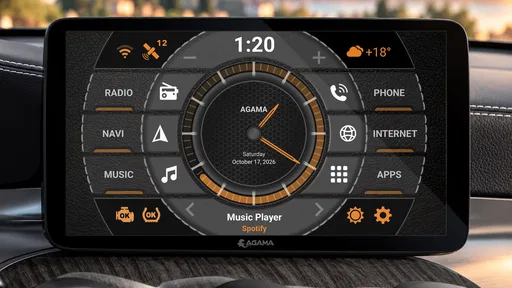
I judge a car launcher less by how many things it can put on a screen and more by whether it makes the first few seconds of a drive simpler. AGAMA Car Launcher is an Android app for reshaping the home screen on compatible car multimedia systems, with navigation, music and other useful controls arranged around the driver’s routine. Its appeal is practical: instead of opening a series of apps from a standard launcher, I can make the dashboard feel more focused on driving tasks.
That distinction matters. AGAMA does not replace a navigation service or music player; it gives those apps a more convenient place to start from. If your car’s Android system feels cluttered or awkward to use, a dedicated launcher can make daily access more consistent. If you are happy with the built-in home screen, though, changing it may not be worth the setup time.
A driving routine that starts on one screen
My preferred way to use a launcher like this is to decide what I genuinely need while parked, then make those items easy to reach before setting off. A typical layout might prioritize a navigation app and music, with less frequently used controls kept out of the main visual path. The point is not to fill every space; it is to reduce the little decisions that otherwise add up when I get into the car.
For example, on a familiar weekday route I might want music ready immediately, while an unfamiliar trip makes navigation the first thing I look for. A dashboard layout that suits both situations is more useful than one that looks impressive but forces me to hunt for the right icon. I recommend trying the screen during setup while parked, then adjusting it after a few ordinary trips rather than attempting to perfect everything at once.
AGAMA is most appealing when the car’s multimedia unit runs Android and the standard launcher does not make these tasks feel natural. It is not a general replacement for every part of the car’s infotainment system, and it cannot turn an incompatible display into an Android unit. That makes checking compatibility on the device itself an important first step before spending time arranging a home screen.
The First Impressions
Downloading and installing the AGAMA Car Launcher was a breeze. Right off the bat, it was clear this app was designed with user-friendliness in mind. The interface is sleek, intuitive, and doesn’t overwhelm you with options, which is a relief because who needs added stress while driving?
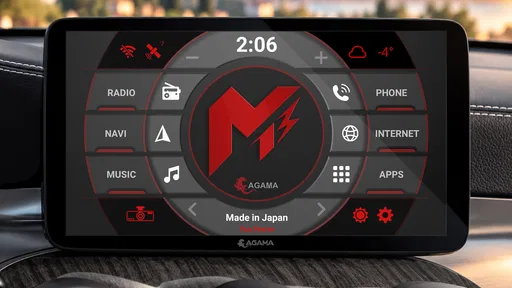
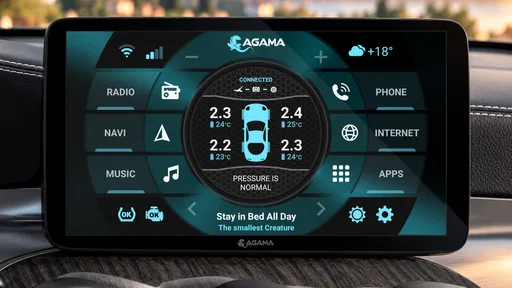
Once set up, you’re greeted with a customizable home screen. This is where AGAMA shines. You can tailor the display to show what's most important to you, be it navigation, music, or even the weather. It’s like having a digital Swiss Army knife right on your dashboard!
Worth Reading Before You Choose

Flipboard Shows What News Apps Must Do Beyond the Feed

Switching to Android Auto Means Rethinking Your Driving Routine

Google Calendar Makes a Crowded Week Easier to Manage

Ludo King Makes the Most of the Minutes Between Plans

Baby Panda World Brings Quick Play to Modern Phones, but Its Game Library Feels Busy

ESPN’s Live Game View Makes Following Close Games Easier
The Features That Stand Out
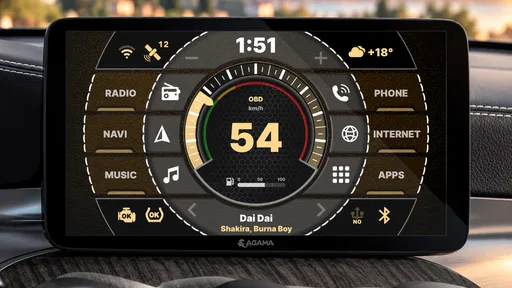
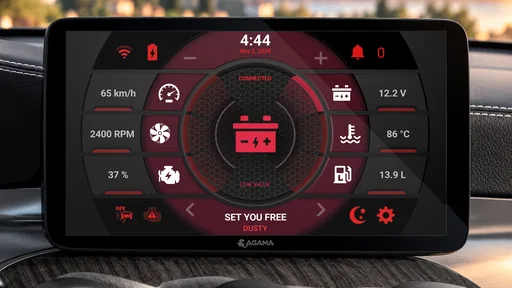
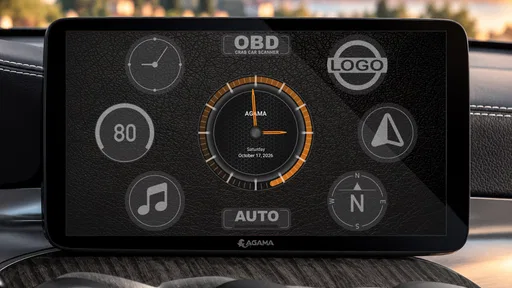
Alright, let’s dive deeper into the features. One of the first things you'll notice is the speedometer widget. It’s not just a pretty face; it’s functional and accurate. It seamlessly integrates with the GPS, providing real-time speed tracking. Plus, you can choose between different styles to suit your mood or match your car’s interior.
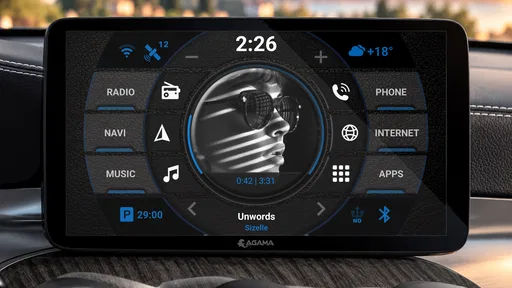
Music lovers, rejoice! The app provides quick access to your favorite music apps, like Spotify and Apple Music. And the best part? You don’t have to fiddle with your phone to skip a track or adjust the volume. Everything is right there, at your fingertips.
For those who love to tinker, the customization options are a playground. From the color schemes to the widgets, you can make the interface truly your own. It’s like giving your car a personality that matches yours.
Settings that are worth checking before a drive
Customization is useful only when it supports a repeatable routine. I’d start by choosing a color treatment and arrangement that remain easy to read in the cabin, then resist the urge to keep changing them while driving. A layout that looks striking at home can be harder to scan when the screen is catching daylight or the car is moving, so visibility should beat decoration.
It is also worth checking what happens when you tap the navigation and music areas. The launcher is a starting point, while the apps themselves handle their own maps, playback and accounts. Confirm that the navigation app you prefer opens as expected and that your music app is already set up before leaving. This small parked-car test avoids discovering an account prompt or an unexpected screen at a junction.
The speedometer widget is best treated as a convenient display, not a reason to stop paying attention to the vehicle’s own instruments. It draws on GPS, so its reading can be affected by the conditions in which GPS is available. I like having the information in the same place as my other driving controls, but I would not use a launcher widget as a substitute for the car’s speedometer.
Navigation Made Easy
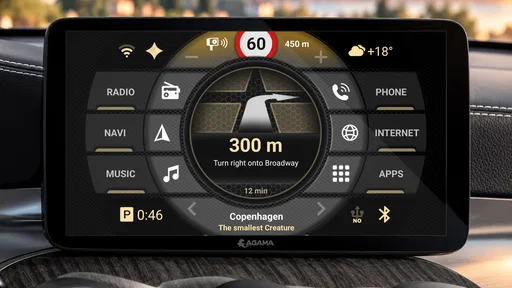
Let’s talk navigation. The app integrates smoothly with Google Maps and other navigation apps. This means you can set your destination with just a tap, and boom, you're on your way. The interface is designed to minimize distractions, providing clear and concise directions without pulling your focus from the road.
One neat feature is the day/night mode, which automatically adjusts the screen brightness based on the time of day. It’s a small touch, but it makes a big difference in visibility and reduces eye strain during those long night drives.
Shortcuts that build a safer habit
The strongest everyday benefit is not a dramatic new capability; it is being able to repeat the same simple sequence. I can get into the car, open the launcher, choose the task I need, and leave the phone alone. Keeping the most-used destinations and entertainment access visible makes that routine easier to remember, particularly when I am in a hurry or driving a route I know well.
There is a useful trade-off here: more visible shortcuts can mean less searching, but a crowded home screen can make each choice harder to find. I would rather keep the screen limited to the handful of actions I actually use than treat every available widget as essential. If I find myself pausing to scan the display, that is a sign to simplify the arrangement while parked.
For a realistic example, imagine leaving work in the evening, needing directions to a new address and wanting audio on for the trip. A clear launcher screen can make the transition from parked to moving more orderly: choose the route, start playback, and then focus on the road. It does not remove the need to set up the destination safely or follow local driving rules, but it can reduce unnecessary tapping around the dashboard.
Keeping Safety in Mind
Safety is a big concern when using any app while driving, and AGAMA seems to take this seriously. The interface’s simplicity means you’re less likely to get distracted. Plus, the voice commands feature allows you to control various functions without taking your hands off the wheel. It’s like having a co-pilot who actually listens to you!
There’s also a handy feature that reminds you not to use your phone while driving. It’s a gentle nudge towards safer driving habits, and honestly, who couldn’t use a little reminder now and then?
I still treat any screen interaction as something to handle before setting off or when safely parked. A cleaner launcher can help make controls easier to find, but it cannot guarantee that a driver will stay focused, and voice control depends on the relevant system and apps behaving as expected. For me, the sensible setup is one that encourages fewer interactions, not one that tempts me to keep adjusting the display on the move.
Where it sits among the alternatives
Compared with leaving the car’s default Android home screen untouched, AGAMA is a more driving-oriented way to organize access to apps and widgets. That can be a meaningful improvement when the stock screen feels generic or makes common actions take too many steps. Compared with using a phone mount and opening apps directly, it keeps the starting point on the car’s multimedia display, provided that display is compatible and already running Android.
Those alternatives can still be better for some people. If your built-in system already gives you reliable navigation and music controls, another layer of customization may add little. If you mainly rely on a phone rather than an Android car unit, a launcher designed for the multimedia system is not the right tool. And if you prefer a fixed, familiar interface with no setup decisions, the default launcher may be less distracting simply because it is already known.
AGAMA is developed by altercars.ru and is listed in the auto and vehicle category. It has a 4.5 average from around 46,000 ratings, with more than five million installs. Those figures suggest that it has found a broad audience, but they do not tell me whether it will suit a particular car display; compatibility and personal preference still matter more than popularity.
Room for Improvement?
Now, no app is perfect, and AGAMA has its quirks. For instance, while it offers a plethora of customization options, some might find the initial setup a bit daunting. It takes a bit of time to figure out what works best for you. However, once you get the hang of it, it’s smooth sailing.
Another thing to note is that the app offers a few premium features that require a purchase. While the basic version is quite functional, some users might feel tempted to unlock everything. It’s a minor gripe, but something to consider if you’re looking to go all-in.
The app is free to try, but the trial lasts 30 days, and in-app purchases are offered at $8.49 per item. I would use that trial as a practical test rather than trying to decide from screenshots: check the launcher on your own display, see whether the layout remains readable, and decide whether its daily convenience is worth paying for. The current version is 5.0.2, and it supports Android 5.0 or later; the age rating is Everyone.
One other limitation is that a launcher’s usefulness depends on the apps and system around it. If a navigation app opens slowly, a media app behaves inconsistently, or the vehicle’s screen is uncomfortable to reach, changing the home screen cannot fix those underlying issues. I would also avoid making repeated layout changes between drives; settling on a small number of reliable shortcuts is more valuable than continually tuning the dashboard.
Who will get the most from it
I’d recommend trying AGAMA if you own a compatible Android multimedia system and regularly switch between navigation and music. It makes the most sense for drivers who like to arrange their screens, have a few repeatable tasks, and want a dashboard that feels more personal than the default interface. Someone who shares a car may also appreciate a layout that keeps the main controls easy to recognize, though each driver should agree on an arrangement that is clear to both.
I would skip it if you rarely use the car’s Android display, have no interest in customization, or already find the stock launcher quick and comfortable. It is also not a safety upgrade in itself. Drivers who expect it to replace their navigation app, fix an awkward vehicle system, or make phone use while moving harmless are likely to be disappointed. The value is in organizing access, not in changing what the connected apps can do.
Final Thoughts
All in all, the AGAMA Car Launcher is a fantastic tool for anyone looking to modernize their car's interface. It’s packed with features that not only make driving more fun but also safer and more efficient. Whether you’re a tech enthusiast or someone who just wants a bit more convenience on the road, AGAMA is worth a shot.
So, if you’re ready to give your car a digital makeover, why not give AGAMA a spin? It might just change the way you drive forever!
My more measured recommendation is to use the trial to answer one straightforward question: does this screen make your normal drive easier without asking for extra attention? If the answer is yes, spend a little time settling on a restrained layout and keep it consistent. If you find yourself fiddling with the design or still reaching for the phone, the default setup may be the better fit.
Pros
- Highly customizable interface.
- Supports many third-party widgets.
- Easy integration with car systems.
- User-friendly and intuitive design.
- Frequent updates and improvements.
Cons
- Limited free features available.
- Some themes require purchase.
- May lag on older devices.
- Initial setup can be complex.
- Not available for all car models.
FAQs for AGAMA Car Launcher
What is AGAMA Car Launcher and how does it enhance my driving experience?
AGAMA Car Launcher is an intuitive app designed to optimize your in-car experience by providing a customizable interface for accessing essential features. It enhances driving by integrating navigation, music, and other apps in a user-friendly dashboard. The design prioritizes ease of use, ensuring drivers can focus on the road while accessing necessary information.
Is AGAMA Car Launcher compatible with all types of vehicles and smartphones?
AGAMA Car Launcher is compatible with most Android devices and works seamlessly with a wide range of vehicles that support Android connectivity. However, it’s essential to check your car’s compatibility with Android apps and ensure your smartphone meets the minimum system requirements for optimal performance.
How can I customize the AGAMA Car Launcher interface to suit my preferences?
AGAMA Car Launcher offers extensive customization options, allowing users to personalize the interface with different themes, colors, and widgets. You can adjust the layout to prioritize navigation, media, or other functions, ensuring the dashboard aligns with your specific driving needs and aesthetic preferences.
Does using AGAMA Car Launcher affect battery life or data usage significantly?
While AGAMA Car Launcher is designed to be efficient, continuous use may lead to increased battery consumption, especially with features like GPS and music streaming. It's advisable to keep your device charged while driving. Data usage depends on the apps and services you integrate, such as online navigation or streaming services.
Is AGAMA Car Launcher safe to use while driving?
AGAMA Car Launcher is designed to enhance safety by providing an intuitive and distraction-free interface. However, it’s crucial to set up the app before starting your journey and avoid making adjustments while driving. Always prioritize safety and adhere to local regulations regarding mobile device use in vehicles.


